PDF to Word
 PDF to Excel
 PDF to HTML
 PDF to Text
 PDF to PDF/A
 PDF to PowerPoint
 PDF to JPG
 HEIC to JPG
 PDF to PNG
 OCR Converter
 Word to PDF
 JPG to PDF
 Excel to PDF
 PDF Converter
 PNG to PDF
 PowerPoint to PDF
 DICOM to PDF
 Merge PDF
 Split PDF
 Delete Pages
 Rotate PDF
 Rearrange PDF
 PDF Editor
 Crop PDF
 DOCX Editor
 Edit PDF Text
 Compress PDF
 Sign PDF
 Redact PDF
 Fill in PDF Forms
 Flatten PDF
 Annotate PDF
 ASK PDF
 PDF Compare
 PDF Viewer
 Office Viewer
 Text Compare
 Validate PDF/A
How to Create Fillable PDF Forms Online
Feb 13 2026
PDF Editing


6 min
Share this post


This guide will show you how to create a fillable PDF form online with Xodo Web. Learn what you need to know about creating PDF forms, form field types, and troubleshooting tips for common issues.
Creating fillable PDF forms online is an effective way to collect information with fewer mistakes and less back‑and‑forth. When fields are typed instead of handwritten, responses stay clean and easy to review.
With Xodo’s online PDF Editor, you can turn any PDF into a fillable form in minutes. You don’t need to install any desktop software. Everything runs in your browser.
In this guide, we'll go over the following:
- How to create fillable PDF forms online
- How to convert static PDF to fillable PDF
- Why choose Xodo to create PDF forms online?
- Advantages for professionals creating fillable PDF forms
- Best practices for creating PDF forms
- Frequently asked questions
How to create fillable PDF forms online
Sign up or log into Xodo Web
- Sign up for a free trial.
- Log in if you already have an account.
An account helps you save files, store edits, and access your work from any device.
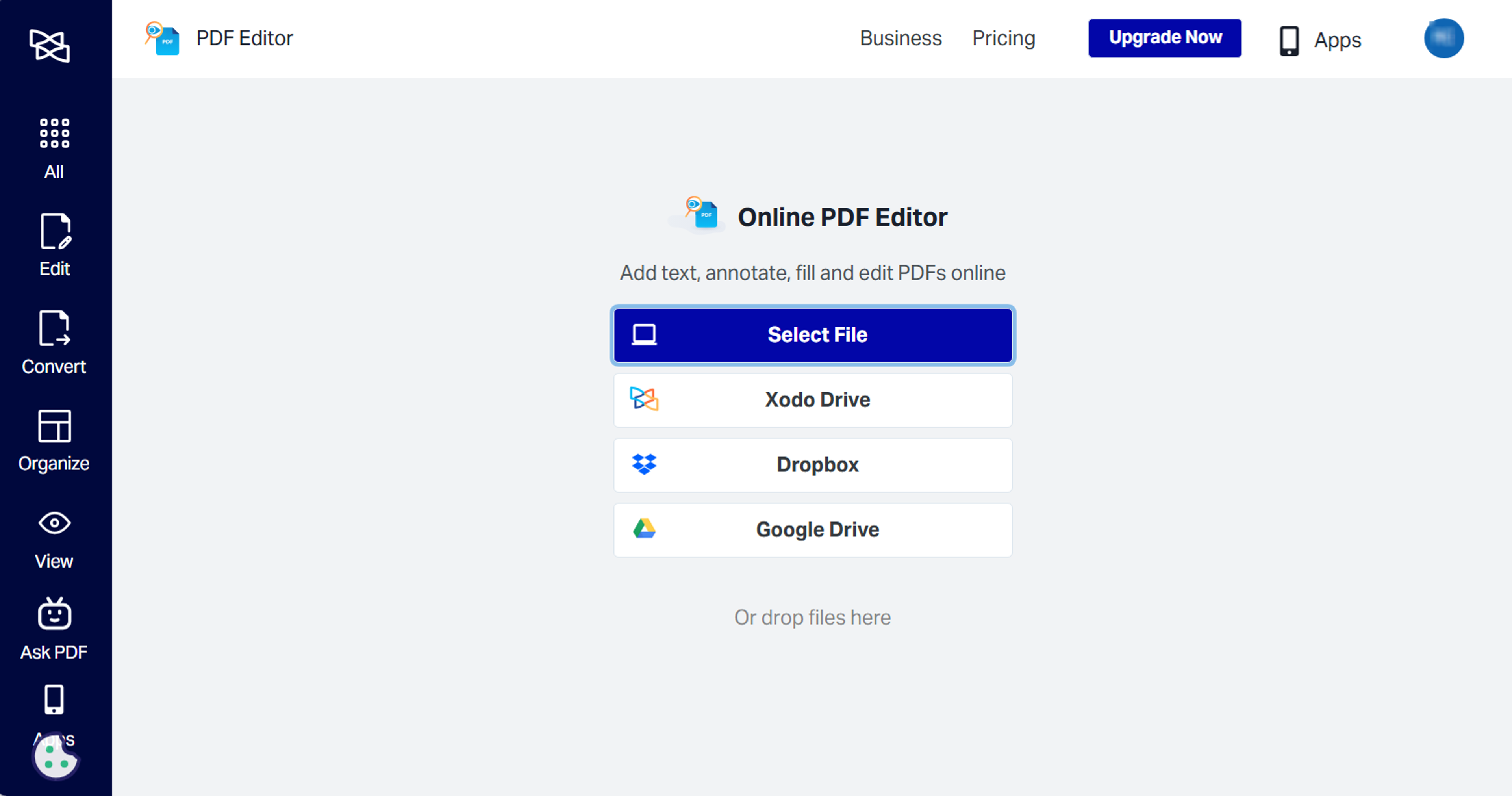
Upload your PDF form
- Go to Xodo’s online PDF Editor tool.
- Upload your PDF form from your computer.
- You can also access it from your cloud storage
- Or, drag and drop it into the tool.

Add PDF form fields
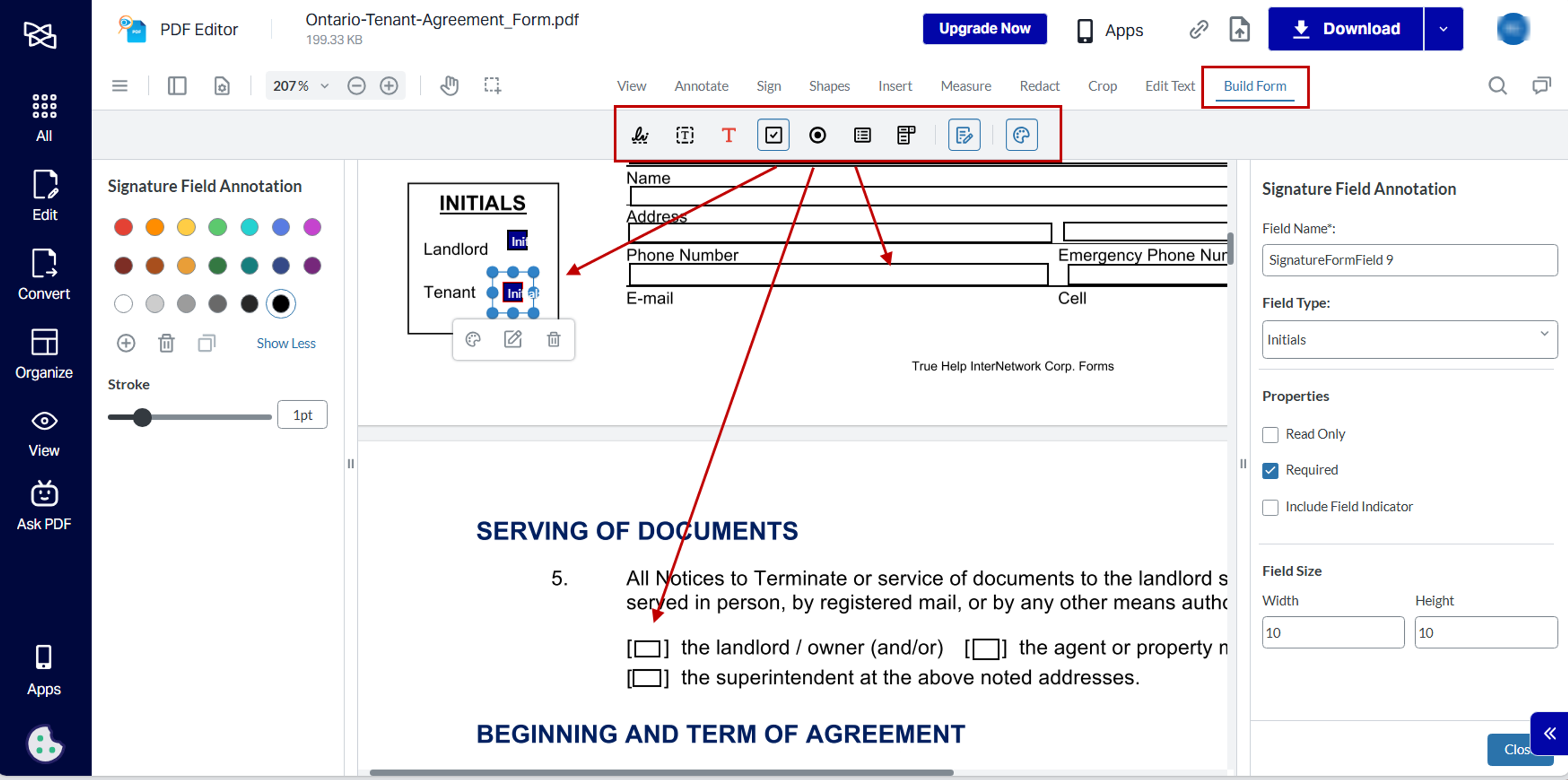
- Go to Build Form in the toolbar.
- Click on the form field you wish to add, and click on the page to place it.
- Add text fields, dropdowns, checkboxes, and signature fields.
- Resize the field by dragging on its handles.
- Customize the field's appearance.
- Specify the field's settings and properties.
- Click on Close.
To remove fields, simply click on it and click on Delete (Trash can icon).

Download, test, and share your form
- Once done, click on Download to save your form.
- Test the form in a PDF viewer to ensure it behaves as expected.
- For adjustments, go back into the Fill Form tool and edit your form fields.


You can also share a working copy of your form directly from Xodo by clicking on the link icon at the top right hand side of the tool page.
If your recipients need to fill in forms online, our guide on how to fill out PDF forms online will walk you through the process.
How to convert static PDF to fillable PDF
Xodo Web can convert a static PDF form into a fillable form in just a few steps:
- Upload your existing PDF document to the PDF Editor.
- Open Build Form.
- Add text fields, dropdowns, checkboxes, signature fields to the page.
- Save and download the new fillable PDF form.
This method is especially helpful for paper forms that were scanned into PDF or created in MS Word and converted to a PDF.
Why choose Xodo to create PDF forms online?
Xodo Web offers a full-featured online PDF platform that's secure, easy to use, and reliable. It lets you create PDF forms seamlessly:
- Quick and easy PDF form creation: Build a full fillable form on-the-spot without any software installation or add‑ons.
- Fast field placement and clean layout tools: Drag-and-drop fillable fields, place them on the page, and build interactive forms quickly.
- Secure storage and sharing: Keep files in your Xodo account or share a copy directly from your browser.
- Full PDF feature set: Use any of Xodo's online PDF tools to edit content, annotate text, and modify PDFs before editing form fields.
- Accurate rendering: Complex PDFs, form layouts, and fonts stay intact, appearing exactly where you place them.
The Xodo advantage for professionals creating fillable PDF forms
Xodo keeps things simple for anyone in any industry to create interactive forms on their own. Here's a look at how Xodo helps:
Industry | Advantage | Impact |
|---|---|---|
Education | Create assignment forms, registration sheets, and permissions without district software. | Fewer paper handouts and cleaner responses from students. |
Healthcare Clinics | Convert intake and consent packets into fillable PDFs patients complete early. | Shorter wait times and less manual data entry for staff. |
Real Estate | Build or adjust disclosure forms, checklists, and client info sheets quickly. | Faster document turnaround during time-sensitive transactions. |
Human Resources | Create onboarding forms without relying on IT or complex software. | A smoother onboarding process with fewer file exchanges. |
Small Business | Build invoices, service forms, and waivers without heavy tools. | Lower operating costs and more flexible workflows. |
If you're working with a team, multi-seat options and pricing are available with Xodo. Everyone on your team can save time, collaborate around the same documents, and work seamlessly with the same tools.
Best practices for creating PDF forms
Choose the right field type
- Text fields: Good for names, addresses, comments, or longer responses common in job applications, surveys, HR onboarding forms and more.
- Checkboxes: Best for yes/no selections or multi‑select questions. You can funnel and filter out information in feedback surveys and waivers.
- Radio buttons: Use these when only one option should be chosen. Good for registration forms with different program options or multiple selections.
- Dropdown menus: Helpful when you want shorter forms with cleaner layouts. Convenient for forms with questions that have pre-defined answers.
- Signature fields: Let users draw, type, or upload signatures. Use these fields on simple forms, quick invoices or business approvals.
Set up form field properties accordingly
- Field name: Clearly label form fields for a well-structured document.
- Read Only or Required: Ensure crucial fields aren't skipped or conversely, restrict them from being filled in.
- Placeholder text: Text that guides the user in filling the field out.
- Default value: Predefined placeholder text to reduce manual input. Users can overwrite them.
- Font and field size: Keep consistent with the size of both fonts and fields by using specific dimensions.
- Field indicators: Add a digital sticky tab to flag important fields that need attention.
Troubleshoot common PDF form issues
- If users find their entries disappear when reopening the completed PDF form, it may be that the PDF may not been saved correctly. Make sure they save the file regularly as they fill it out.
- Instruct users to update to the latest version of their PDF reader, since outdated tools can fail to preserve the form data.
- If a field rejects the entered data, the validation rules may be too strict. You may have to remove or change the form field settings.
- Test your form with a variety of sample entries to get a good balance of data and user convenience.
- If the exported form data isn't matching up with the form fields as you expected, you may have an outdated form. Avoid version confusion by using strict file naming conventions and specific folders.
Frequently asked questions
Can I create a fillable PDF online for free?
Yes. Xodo’s online PDF Editor lets you add basic form fields without paying or installing software. You can start a free trial to test out its features.
Can I add a digital signature field to a PDF?
Yes. Xodo includes an electronic signature field where users can draw, type, or upload their signature and sign forms that don't require legal compliance.
Can I make certain fields required?
Yes. When you add fillable form fields in Xodo, open the properties panel and check the Required options for it. Users won’t be able to finish the form until they complete those fields.
Can I edit a fillable PDF after someone already filled it out?
Yes. You can upload the completed PDF to Xodo and adjust the fields. The original responses stay intact as long as you don’t delete or replace the fields that contain data.
If you need to update the structure of the form, you can download a new version and keep the filled copy as a separate file.
Why won’t my PDF save the form data?
The file may not have been fully saved or the reader is outdated. Try saving the file again or updating the PDF viewer.
Can I share a fillable PDF directly from Xodo?
Yes. You can either use the Xodo share link option to send a working copy to colleagues, or you can download the final form once its done and email it to others.
Create your next fillable form online with Xodo
You can build a fillable PDF form online with Xodo in just a few clicks. The editor keeps the process simple.
From adding text fields to placing signature boxes, Xodo gives you the tools to make a PDF fillable and capture the data you need.
Create your next form today and keep your workflow easier to manage.


Related Articles

How to Batch Flatten Fillable PDF Forms Offline
Completed fillable PDFs can remain interactive when you need final copies. Batch form flattening creates static outputs from multiple files offline. Learn how to prepare, process, and check your PDFs with Xodo PDF Studio.


How to Fill Out PDF Forms Online Without Printing or Scanning
Filling out PDF forms doesn't have to be difficult. Xodo Web's PDF editor lets you perform the entire task online without any printing or scanning. Simply upload your PDF, fill out the fields, and share the finished form. Check out our guide for quick and easy steps to complete your forms.

How to Export and Reuse PDF Form Data
Export and reuse PDF form data using Xodo PDF Studio. We'll show you how to set clear field names, export your data file, import it into a new form when needed, and more. Get full steps and tips from our guide.